
Environments
Environments define variable sets applied when executing requests. URLs, headers, and bodies can reference variables with syntax.
Generated environment
On scan, APIScope creates a Generated Environment (id: generated) with at least:
{
  "id": "generated",
  "name": "Generated Environment",
  "source": "generated",
  "environmentType": "LOCAL",
  "variables": [
    { "name": "baseUrl", "value": "http://localhost:8080" }
  ]
}
Never hardcode hostnames in request URLs — always use /path.
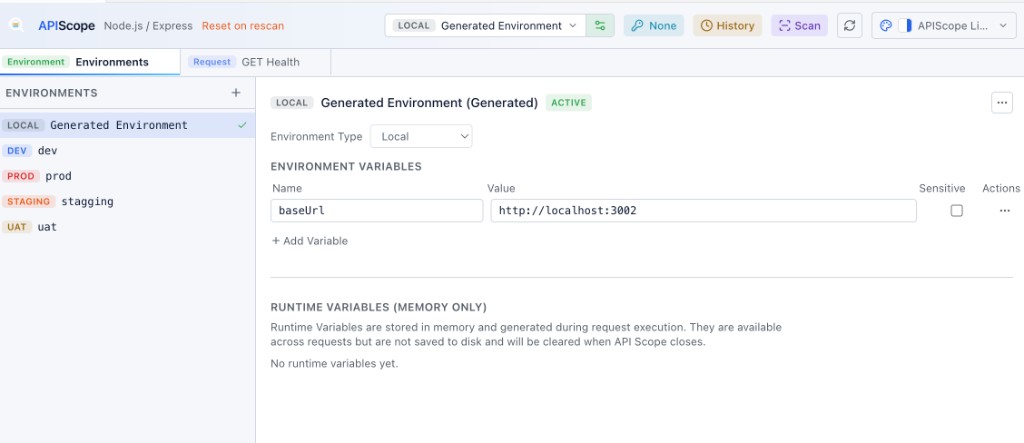
User environments
Create additional environments for DEV, UAT, STAGING, PROD, or custom tiers:
- Open the Environments tab
- Click New Environment
- Add variables and select an environment tier badge
User environments are stored under .apiscope/environments/environment-NNN/environment.json.
The Environments tab shows the active environment and its persisted variable table. Runtime variables (memory-only values from request execution) appear in a separate section below — see Runtime Variables.
Variable substitution
Variables resolve in:
- Request URL
- Header values
- Query parameter values
- JSON and form body fields
Type {{ in any supported field to see autocomplete for variables from the active environment and runtime store.
Active environment
The active environment id is stored in .apiscope/config.json:
{
  "activeEnvironmentId": "generated"
}
Switch environments from the Environments tab or the environment selector in the request toolbar.
Environment tiers
Each environment has an environmentType tier for visual identification:
| Tier | Typical use |
|---|---|
LOCAL | localhost development |
DEV | shared dev server |
UAT | user acceptance |
STAGING | pre-production |
PROD | production (use with care) |
CUSTOM | other |
On disk
environments/
├── index.json
├── generated/
│   └── environment.json
└── environment-001/
    └── environment.json
environments/index.json lists all environment ids, names, and sources for quick enumeration.
Git ignore
Environment files are listed in .apiscope/.gitignore by default because they often contain machine-specific URLs. Commit a template or document required variables in your project README if teammates need them.